Page 1 of 1

Can only get part of sent data.

Posted: Mon Nov 06, 2023 12:14 pm
by drutledge11
I am trying to read the data from an Apperson Datalink 1200 bubble card reader. The cards I feed to it have 35 lines of choices, each with 0 to 10 as answers. The last 5 'bubbles' are the student ID and are 0 to 9. I have software on a PC that can read the data fine, I'm trying to build out something for a Mac since that's what our school's teachers use the most. (Company has no plans on offering Mac support).

I have managed to get the last group's data (Student ID) read if I use 38400 baud rate but can't get anything else no matter what baud rate and other setting I use. To be exact, I get 5 numbers (all correct as marked), maybe about 5 spaces, a comma and then 3 zeros. (ex. "07210 ,000") I would expect to get at least 35 numbers. Any other baud rate gives a various length of gibberish.

Any ideas on how to get the rest of the data?
Re: Can only get part of sent data.

Posted: Mon Nov 13, 2023 5:05 pm
by roger
I'm afraid I don't have any experience with these types of devices. Do you know if it uses some sort of handshaking? Does it require a special driver for macOS?

Since this works on your PC with your software, then we can assume the serial driver works fine. I would recommend using CoolTerm on Windows to see if you can read the data that way.

Re: Can only get part of sent data.

Posted: Tue Nov 14, 2023 11:46 am
by drutledge
Thanks so much for your reply.

CoolTerm on the PC gets the same results; first 5 digits or so (correctly) then some spaces then some zeros.

I have two of the machines and a bunch of USB to USB and Serial to USB cables that I’ve tried. (The machines have 9 pin (?) serial AND a square USB port).

Here’s the thing that now has me really frustrated, it magically seemed to be working with CoolTerm on my Mac after playing around for a few days on and off. Then it stopped again. I’ve tried every combo of machine and cable. Methodically. Can’t get it to work again. I recall that when it was working a few days ago that the settings in CoolTerm didn’t seem to make much difference in the results, besides Baud Rate of course. (It was spitting out more data than I needed, I wrote a script to edit them out when it seemed that changing CoolTerm settings weren’t the problem.)

Any Ideas? I remember poking around looking for drivers for the different Serial to USB cords I had. Maybe I installed one and it’s now gone? Doesn’t seem likely but I’m grasping at straws here….

Thanks Again.

Re: Can only get part of sent data.

Posted: Tue Nov 14, 2023 12:24 pm
by roger
Ok, so on the same PC where it works fine with the software you got, it doesn't work with CoolTerm, correct? If so, that would indicate that, on a lower lever (i.e. the driver, etc), everything appears to be working.

I assume your other serial port settings (number of data bits, parity, number of stop bits) is set correctly?

Do you have to send it some command or data in order for it to send data back? If so, do these commands need to be terminated with either CR, or CR+LF, etc? CoolTerm sends CR+LF by default when the enter key is pressed.

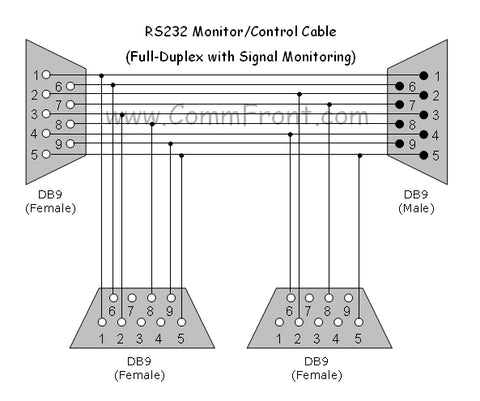
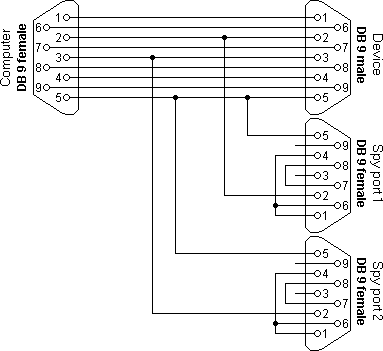
Perhaps it may be a good idea to sniff out the serial traffic between your card reader and its software on the PC. If you have 2 additional serial ports available (doesn't have to be on the same computer), you can observe the traffic with a cable like this:
Image
You can then use two additional CoolTerm windows, one for each spy port, to observe what's going back and forth. Perhaps this will shed a light.

Re: Can only get part of sent data.

Posted: Sun Nov 19, 2023 10:07 am
by drutledge11
I do not have to send any commands. The machine sits there idle sending nothing until a paper is passed through the scanner. It then sends it's one line of data and waits again.

I have two choices of port when machine is hooked up (usbserial - FTDHLLUB or usbserial-2) both work the same. This is with a serial to USB cable.
BaudeRate: Only 38400 gives correct data.
Data bits: Only 8 works well
Parity: Only NONE works
Stop bits: all work the same
Flow control: all work the same
Software Supported FC, Block, DTR and RTS all work the same no matter the setting.

Again, I had it working somehow before. I'm pretty sure I used the same saved settings (.stc file) but now it stopped working again. Different machines different cables.

I don't suppose there is a place to buy a 'sniffer cable'?

Re: Can only get part of sent data.

Posted: Sun Nov 19, 2023 12:40 pm
by roger
drutledge11 wrote: Sun Nov 19, 2023 10:07 am I don't suppose there is a place to buy a 'sniffer cable'?
Actually, there is: https://www.commfront.com/products/full ... 9209126659
Image
This one even lets you monitor the handshake and control signals.

Re: Can only get part of sent data.

Posted: Sun Nov 19, 2023 12:50 pm
by roger
drutledge11 wrote: Sun Nov 19, 2023 10:07 am BaudeRate: Only 38400 gives correct data.
Data bits: Only 8 works well
Parity: Only NONE works
Stop bits: all work the same
Flow control: all work the same
Software Supported FC, Block, DTR and RTS all work the same no matter the setting.
Ok, so it seems 38400 8-N-1 is what your device needs. It might still need some hardware handshaking. Can you do a test with handshaking disabled and then manually toggling the RTS and DTR lines? You can do that by either clicking on the respective LEDs icons in the bottom right of the CoolTerm window, or via the "Connection" menu. See if that will make your device send additional data.

Re: Can only get part of sent data.

Posted: Sun Nov 19, 2023 3:24 pm
by drutledge11
If I had not had this working on my Mac with just CoolTerm, I would have given up by now but since I did have it working I am now determined to figure it out (again).

Thanks for all of your help.

I turned off both RTS and DTR lines and got the same results. Turning on each one separately gave the same thing.

For what it's worth here are examples of GOOD and BAD results. The good from the couple of halcyon days it was working.

GOOD:
04300 ,145,0980,0000, , , ,001, 02 03 03 03 03 03 03 03 03 03 01 , ,0,1,2,3,4,5,6,7,8,9,10,9,8,7,6,5,4,3,2,1,0,1,2,3,4,5,6,7,8,9,,,,,,,,,,,,,,,,,,,,,,,,,,,,,,,,,,,,,,,,,,,,,,,,,,,,,,,,,,,,,,,,,,,,,,,,,,,,,,,,,,,,,,,,,,,,,,,,,,,,,,,,,,,,,,,,,,,,,,,,,,,,,,,,,,,,,,,,,,,,,,,,,,,,,,,,,,,,,,,,,,,,,,,,,,,

BAD:
03160 ,000

The whole, "it was working / now it's not" seems so odd to me. What could have changed? It seems to be a setting, right? Can I give up trying other cables, drivers, etc. since I'm getting SOME data just not all of it? FWIW, I don't recall making any changes directly before or after it started to work/didn't work. Just seemed that I sat down, ran a paper through and it just worked (then didn't) a few days later.

Re: Can only get part of sent data.

Posted: Sun Nov 19, 2023 4:01 pm
by roger
Is your scanner battery powered? I wonder if perhaps power-cycling it might help. I have had it happen where there firmware on a device got itself into a wonky state, and taking the battery out and putting it back in helped.
Also, perhaps a reboot of the computer might be a good thing to do.